Next.js tutorial
Build a Next.js SaaS Prototype with AI: A Tested Invoicing Demo
A Next.js 14 invoicing prototype generated by GPT-6.2 Sol in LoomCode AI: tested pages and filters, the code, and what a real SaaS still needs.
A SaaS prototype is a clickable demo: the pages, the flows, and believable sample data, with no accounts, payments or database behind them. LoomCode AI can generate one with the Next.js template in a single prompt. On 2026-11-22 we generated an invoicing prototype with a landing page, a filterable dashboard and invoice detail pages, then tested it in a browser. This page shows the code, the results, and the list of things a real SaaS would still need, which is most of the work.
Open this prompt in the builderThe prompt
Framework Next.js, model GPT-6.2 Sol:
A SaaS prototype for an invoicing tool. A marketing landing page at / with a pricing section, a /dashboard page listing 12 invoices from in-memory mock data with a status filter (paid, due, overdue) and totals, and a /dashboard/[id] invoice detail page. No authentication and no database; label the data as sample data.
The prompt lists the routes, gives exact counts to test against, and rules out what the sandbox can't provide: the Next.js template has no database, and authentication would need a provider. "Label the data as sample data" carried through to every page.
What the run produced
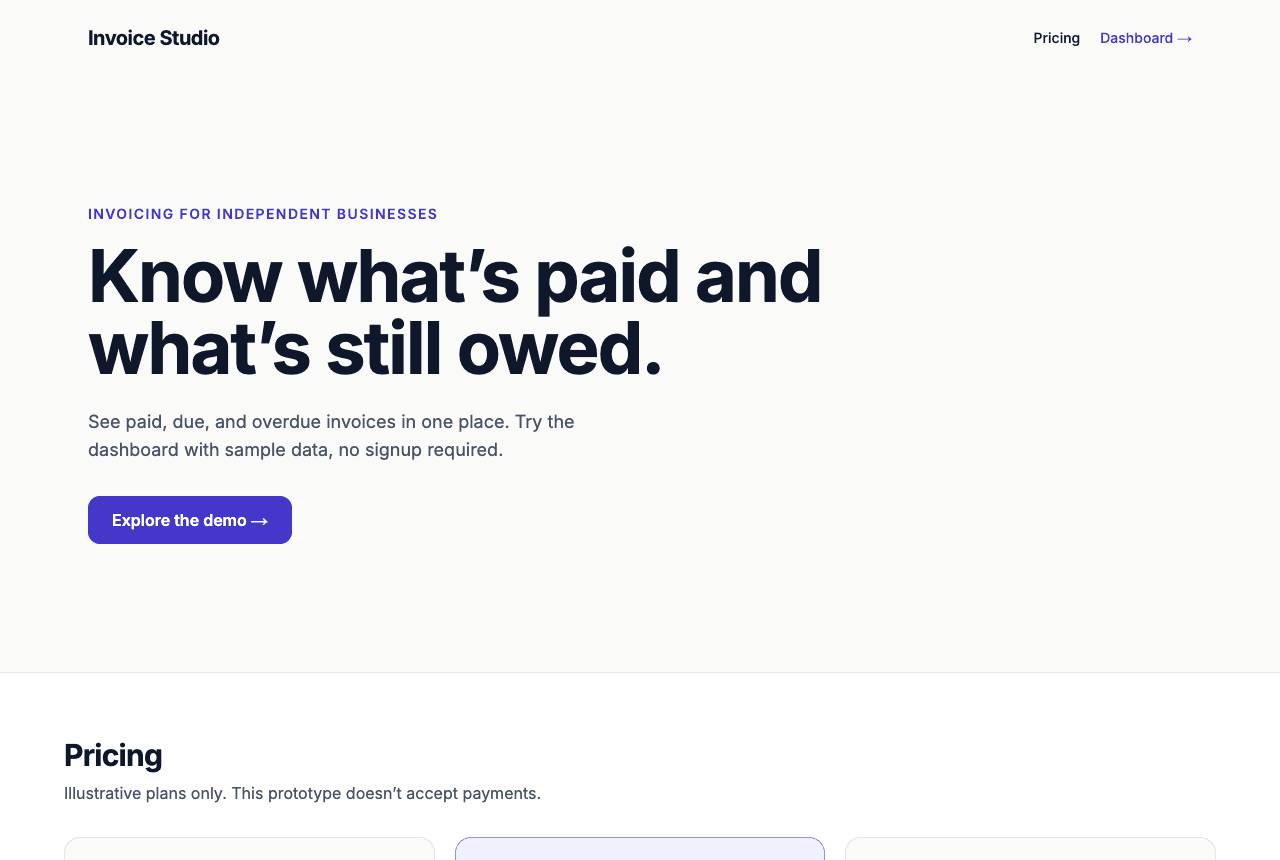
The six files
app/page.tsx                     landing page with pricing
app/lib/invoices.ts              types, 12 sample invoices, formatters
app/components/StatusBadge.tsx   colored status pill
app/components/InvoiceTable.tsx  client component: filter, totals, table
app/dashboard/page.tsx           /dashboard
app/dashboard/[id]/page.tsx      /dashboard/INV-1001 … INV-1012
The data module is the core of the prototype:
export type InvoiceStatus = 'paid' | 'due' | 'overdue';

export interface Invoice {
  id: string;
  client: string;
  service: string;
  issuedOn: string;
  dueOn: string;
  amountCents: number;
  status: InvoiceStatus;
}

export const statusLabels: Record<InvoiceStatus, string> = { paid: 'Paid', due: 'Due', overdue: 'Overdue' };
export const sampleAsOf = '2026-04-15';

// Fixed status snapshot for the demo; statuses do not change with the system clock.
const rows: [string, string, string, string, number, InvoiceStatus][] = [
  ['Aster Paper', 'Packaging design', '2026-04-12', '2026-05-12', 180000, 'due'],
  ['Birch & Beam', 'Website audit', '2026-04-10', '2026-05-10', 95000, 'paid'],
  ['Cloudberry Press', 'Editorial layout', '2026-04-07', '2026-05-07', 125000, 'due'],
  ['Drift Studio', 'Illustration', '2026-04-02', '2026-05-02', 74000, 'paid'],
  ['Ember Works', 'Brand refresh', '2026-03-30', '2026-04-29', 265000, 'due'],
  ['Fern Supply', 'Product photography', '2026-03-25', '2026-04-24', 110000, 'paid'],
  ['Grove Goods', 'Monthly retainer', '2026-03-19', '2026-04-18', 150000, 'due'],
  ['Harbor Types', 'Typography consulting', '2026-03-10', '2026-04-09', 68000, 'overdue'],
  ['Indigo Orchard', 'Landing page design', '2026-03-08', '2026-04-07', 220000, 'paid'],
  ['Juniper House', 'Copywriting', '2026-03-04', '2026-04-03', 84000, 'overdue'],
  ['Kite Workshop', 'Creative direction', '2026-02-25', '2026-03-27', 195000, 'paid'],
  ['Lumen Letter', 'Newsletter design', '2026-02-20', '2026-03-22', 56000, 'overdue'],
];

export const invoices: Invoice[] = rows.map(([client, service, issuedOn, dueOn, amountCents, status], index) => ({
  id: `INV-${1012 - index}`, client, service, issuedOn, dueOn, amountCents, status,
}));

const currency = new Intl.NumberFormat('en-US', { style: 'currency', currency: 'USD' });
const dateFormat = new Intl.DateTimeFormat('en-US', { dateStyle: 'medium', timeZone: 'UTC' });
export const formatMoney = (cents: number) => currency.format(cents / 100);
export const formatDate = (date: string) => dateFormat.format(new Date(`${date}T00:00:00Z`));
Some choices here are worth keeping when you build further. Amounts are stored as integer cents. Statuses are a fixed snapshot "as of" 2026-04-15, so the demo doesn't change with the system clock. Dates are formatted in UTC, which avoids server/client hydration mismatches.
'use client';

import { useState } from 'react';
import Link from 'next/link';
import { formatDate, formatMoney, statusLabels, type Invoice, type InvoiceStatus } from '../lib/invoices';
import StatusBadge from './StatusBadge';

type Filter = 'all' | InvoiceStatus;
const filters: Filter[] = ['all', 'paid', 'due', 'overdue'];

export default function InvoiceTable({ invoices }: { invoices: Invoice[] }) {
  const [filter, setFilter] = useState<Filter>('all');
  const visible = filter === 'all' ? invoices : invoices.filter(invoice => invoice.status === filter);
  const totals = visible.reduce((sum, invoice) => {
    sum[invoice.status] += invoice.amountCents;
    return sum;
  }, { paid: 0, due: 0, overdue: 0 });
  const summary = [
    ['Invoice total', totals.paid + totals.due + totals.overdue],
    ['Paid', totals.paid], ['Due', totals.due], ['Overdue', totals.overdue],
  ] as const;

  return (
    <section className="space-y-5" aria-label="Invoice list">
      <fieldset>
        <legend className="mb-2 text-sm font-semibold">Filter by status</legend>
        <div className="flex flex-wrap gap-2">
          {filters.map(value => (
            <label key={value} className="cursor-pointer">
              <input type="radio" name="invoice-status" value={value} checked={filter === value} onChange={() => setFilter(value)} className="peer sr-only" />
              <span className="inline-block rounded-lg border border-stone-300 bg-white px-4 py-2 text-sm font-medium peer-checked:border-indigo-700 peer-checked:bg-indigo-700 peer-checked:text-white peer-focus-visible:ring-2 peer-focus-visible:ring-indigo-600 peer-focus-visible:ring-offset-2">{value === 'all' ? 'All' : statusLabels[value]}</span>
            </label>
          ))}
        </div>
      </fieldset>
      <p role="status" className="text-sm text-slate-600">Showing {visible.length} of {invoices.length} invoices · Totals reflect this filter</p>
      <dl className="grid grid-cols-2 gap-3 lg:grid-cols-4">
        {summary.map(([label, cents]) => <div key={label} className="rounded-xl border border-stone-200 bg-white p-4"><dt className="text-sm text-slate-600">{label}</dt><dd className="mt-2 text-xl font-bold tabular-nums">{formatMoney(cents)}</dd></div>)}
      </dl>
      <div className="overflow-x-auto rounded-xl border border-stone-200 bg-white" tabIndex={0} role="region" aria-label="Invoice table">
        <table className="w-full whitespace-nowrap text-left text-sm">
          <caption className="sr-only">Sample invoices matching the selected status</caption>
          <thead className="bg-stone-100"><tr>{['Invoice', 'Client', 'Due date', 'Status', 'Amount'].map(label => <th key={label} scope="col" className={`px-4 py-3 ${label === 'Amount' ? 'text-right' : ''}`}>{label}</th>)}</tr></thead>
          <tbody className="divide-y divide-stone-200">
            {visible.map(invoice => <tr key={invoice.id} className="hover:bg-stone-50">
              <th scope="row" className="px-4 py-3"><Link href={`/dashboard/${invoice.id}`} className="font-semibold text-indigo-700 hover:underline">{invoice.id}</Link></th>
              <td className="px-4 py-3">{invoice.client}</td>
              <td className="px-4 py-3"><time dateTime={invoice.dueOn}>{formatDate(invoice.dueOn)}</time></td>
              <td className="px-4 py-3"><StatusBadge status={invoice.status} /></td>
              <td className="px-4 py-3 text-right font-medium tabular-nums">{formatMoney(invoice.amountCents)}</td>
            </tr>)}
            {visible.length === 0 && <tr><td colSpan={5} className="p-6 text-center text-slate-600">No invoices match this status.</td></tr>}
          </tbody>
        </table>
      </div>
    </section>
  );
}
InvoiceTable is the only client component ('use client'). The filter is a radio group styled as buttons, the summary cards total only the visible rows, and a live status line reports "Showing N of 12 invoices". The pages that use it stay server components.
import Link from 'next/link';
import { notFound } from 'next/navigation';
import StatusBadge from '../../components/StatusBadge';
import { formatDate, formatMoney, invoices } from '../../lib/invoices';

export function generateStaticParams() {
  return invoices.map(({ id }) => ({ id }));
}

export default function InvoicePage({ params }: { params: { id: string } }) {
  const invoice = invoices.find(({ id }) => id === params.id);
  if (!invoice) notFound();

  return (
    <main className="min-h-screen bg-stone-50 px-6 py-10 text-slate-900">
      <div className="mx-auto max-w-3xl">
        <Link href="/dashboard" className="text-sm font-semibold text-indigo-700 hover:underline">← All invoices</Link>
        <article className="mt-6 rounded-2xl border border-stone-200 bg-white p-6 sm:p-10">
          <header>
            <p className="text-xs font-bold uppercase tracking-widest text-indigo-700">Sample data · Not payable</p>
            <div className="mt-3 flex flex-wrap items-center justify-between gap-3">
              <h1 className="text-3xl font-bold tracking-tight">Invoice {invoice.id}</h1>
              <StatusBadge status={invoice.status} />
            </div>
          </header>
          <dl className="my-8 grid gap-5 text-sm sm:grid-cols-3">
            <div><dt className="text-slate-600">Billed to</dt><dd className="mt-1 font-semibold">{invoice.client}</dd></div>
            <div><dt className="text-slate-600">Issued</dt><dd className="mt-1 font-semibold"><time dateTime={invoice.issuedOn}>{formatDate(invoice.issuedOn)}</time></dd></div>
            <div><dt className="text-slate-600">Due date</dt><dd className="mt-1 font-semibold"><time dateTime={invoice.dueOn}>{formatDate(invoice.dueOn)}</time></dd></div>
          </dl>
          <table className="w-full text-sm">
            <caption className="sr-only">Invoice line items in USD</caption>
            <thead className="border-y border-stone-200 bg-stone-50"><tr><th scope="col" className="p-3 text-left">Service</th><th scope="col" className="p-3 text-right">Amount (USD)</th></tr></thead>
            <tbody><tr><td className="p-3">{invoice.service}</td><td className="p-3 text-right tabular-nums">{formatMoney(invoice.amountCents)}</td></tr></tbody>
            <tfoot className="border-t border-stone-200 font-bold"><tr><th scope="row" className="p-3 text-left">Invoice total</th><td className="p-3 text-right tabular-nums">{formatMoney(invoice.amountCents)}</td></tr><tr><th scope="row" className="px-3 pb-3 text-left">Balance due</th><td className="px-3 pb-3 text-right tabular-nums">{formatMoney(invoice.status === 'paid' ? 0 : invoice.amountCents)}</td></tr></tfoot>
          </table>
        </article>
      </div>
    </main>
  );
}
The detail page prerenders all 12 ids with generateStaticParams and calls notFound() for unknown ids. It marks the invoice "Sample data · Not payable" and shows a zero balance for paid invoices. The run didn't use any of the shadcn/ui components that come preinstalled in the template.
What we checked
| Check | Result |
|---|---|
/ | HTTP 200, headline and pricing rendered |
/dashboard | HTTP 200, 12 rows, "Showing 12 of 12 invoices" |
| Filter: Paid | "Showing 5 of 12 invoices" |
| Filter: Due | "Showing 4 of 12 invoices" |
| Filter: Overdue | "Showing 3 of 12 invoices", total $2,080.00 |
| First invoice link | /dashboard/INV-1012, HTTP 200, Aster Paper, $1,800.00 |
| Uncaught page errors | None |
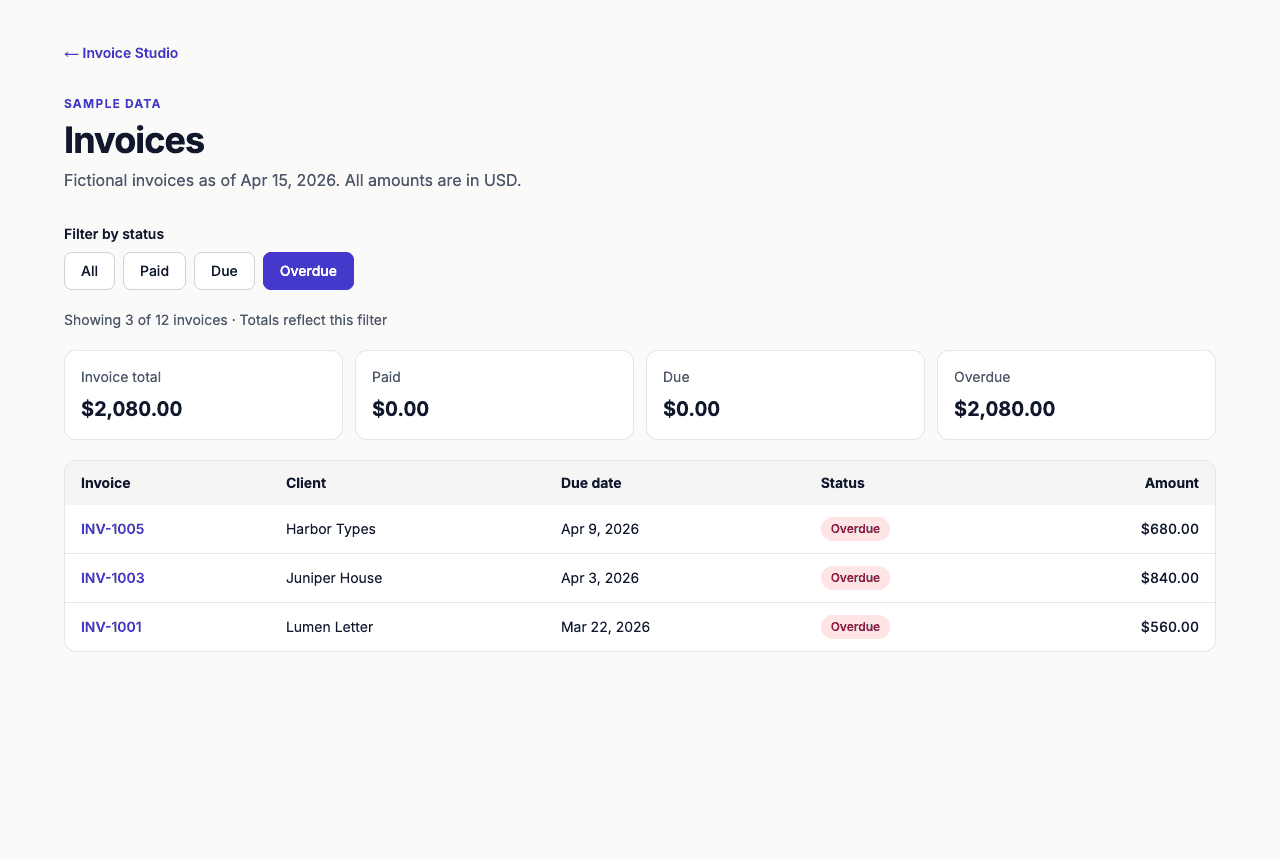
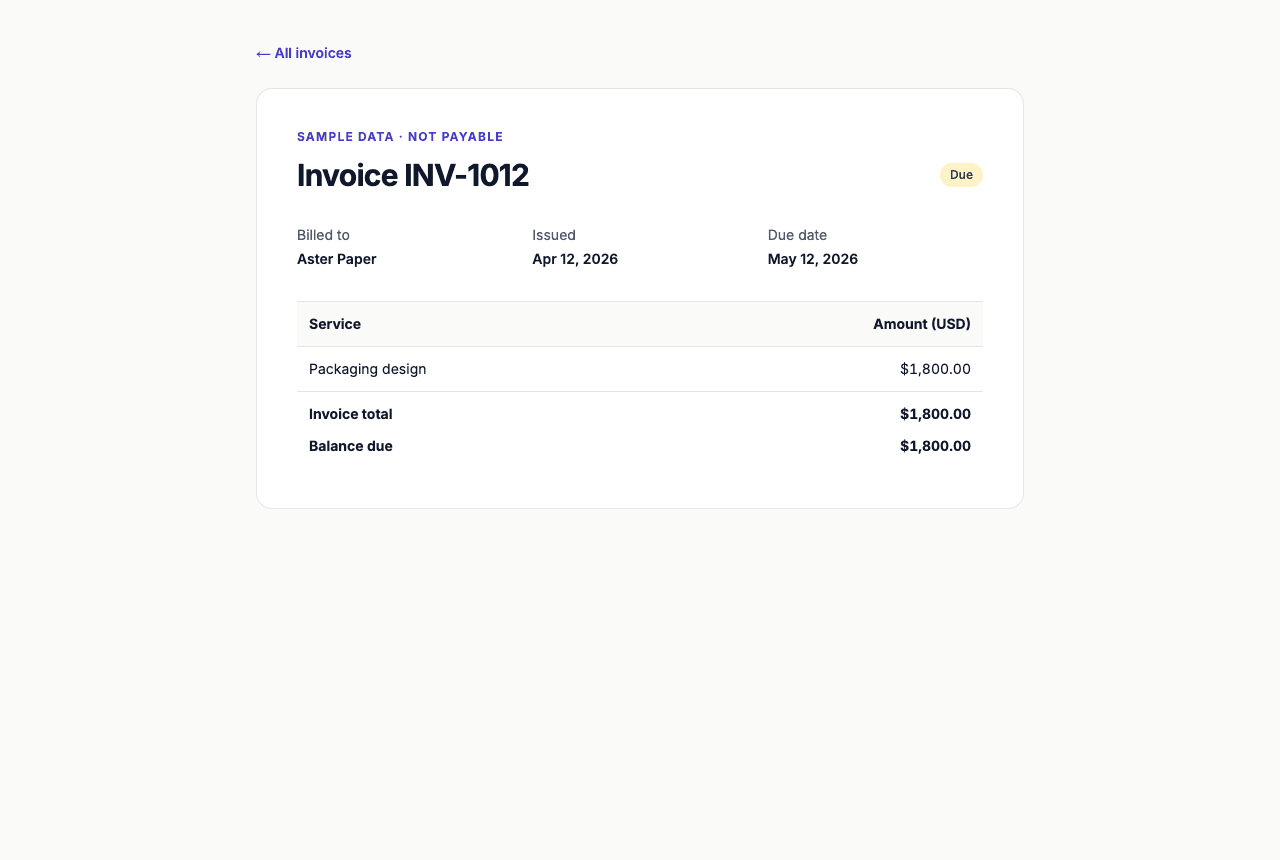
We didn't test the unknown-id 404 path, keyboard use of the filter, or narrow screens.
What's missing for a real SaaS
The prototype is useful for showing a flow to users, investors or teammates, and for settling layout and copy. It is not the start of a production system in any meaningful sense. Before anyone pays for it, you would need at least:
- Authentication and authorization. Sign-up, sign-in, password reset, sessions, and per-route access checks. Today
/dashboardis public. - A database and data model. Customers, invoices, line items (the prototype has one service per invoice), payments, audit history, and migrations.
- Multi-tenancy. Every query scoped to an organization, with tests proving one tenant can't read another's invoices.
- Billing for your own product. Subscriptions, plan limits, trials and failed-payment handling, through a payment provider.
- The invoicing itself. Invoice numbering, taxes, currencies, PDF generation, sending email, reminders, and recording payments.
- Operations. Error monitoring, backups, rate limiting, a privacy policy and terms, and tests.
None of this comes from one prompt, and a generated starting point doesn't make it smaller. The MVP development and rapid prototyping pages discuss where AI-generated code helps along that path.
A note on Next.js 14.2.20
The sandbox runs Next.js 14.2.20, and the generated code targets it:
| Framework | Runtime | Key packages | Output | Observed in E2B |
|---|---|---|---|---|
| React | Node.js 22.23.5 | react 19.2.4, react-dom 19.2.4, vite 8.3.8, typescript 5.9.3 | web preview | Nov 23, 2026 |
| Next.js | Node.js 21.7.3 | next 14.2.20, react ^18, tailwindcss ^3.4.1, shadcn/ui components | web preview | Nov 22, 2026 |
| Vue / Nuxt | Node.js 21.7.3 | nuxt ^4.0.3, vue ^3.5.20, nuxi 3.28.0 | web preview | Nov 22, 2026 |
| Python (code interpreter) | Python 3.13 | pandas 2.2.3, matplotlib 3.11.2, plotly 6.0.1, seaborn 0.13.2 | notebook output | Nov 22, 2026 |
| Streamlit | Python 3.9.23 | streamlit 1.49.1, pandas 2.3.2, numpy 2.0.2, plotly 6.3.0 | web preview | Nov 22, 2026 |
| Gradio | Python 3.9.23 | gradio 4.44.1 | web preview | Nov 22, 2026 |
| PHP | PHP 8.2.29 | Composer 2.8.11, PDO (sqlite, mysql drivers) | web preview | Nov 22, 2026 |
| Laravel | PHP 8.2.29 | Laravel Framework 12.27.0, SQLite | web preview | Nov 22, 2026 |
In Next.js 14, params in a page is a plain object, which is why the detail page reads params.id directly. Next.js 15 made params asynchronous. If you move this code to 15 or later, change the page to async, type params as a Promise, and await it. The Next.js 15 upgrade guide explains the change and offers a codemod. The export README pins the version that matches the sandbox, so the code runs unchanged.
Run it locally and deploy it
Export Generated files (.zip). The README in the archive lists these steps:
npx create-next-app@14.2.20 invoice-studio --ts --tailwind --app --no-src-dir --import-alias "@/*"
# copy the app/ files from the ZIP into invoice-studio/app/
cd invoice-studio
npm run dev
The generated app/page.tsx replaces the starter page. If a future run uses shadcn/ui components, the README adds the shadcn commands it needs. This run used none.
Next.js apps deploy to any Node.js host or to platforms with Next.js support. See Next.js deployment. A LoomCode Share preview extends the sandbox for up to 24 hours, which is enough for a demo meeting but isn't hosting. Our deployment guide explains the difference.
Reproduce it
- Click the builder button at the top of this page.
- If sign-in is enabled on this deployment, you'll be asked to sign in.
- Click each filter and open a detail page. Your code will differ from ours, because models don't give identical output each time.
Follow-up ideas, not tested: "Add a /dashboard/new form that validates client, service, amount and due date and adds the invoice to in-memory state" or "Add a client list page grouped by total outstanding."
Related
- The Next.js template page lists what the sandbox includes.
- Build a React dashboard is a single-page alternative without a framework.
- Landing pages shows a tested Next.js marketing page with a demo signup form.
- AI app builder prompts collects this prompt and nine others with their results.