Use case
Landing pages: generate a working first draft in Next.js
A tested landing page run: hero, pricing plans, how-it-works, FAQ and a validated signup form in Next.js, what is demo-only, and how to hand it off to hosting.
A landing page is a good first job for an AI app builder: the structure is well known, the content is yours to supply, and you can judge the result by looking at it. LoomCode writes the page as a small Next.js project and runs it in a live preview, so you can click the navigation, open the FAQ and try the form before you decide whether to keep it. What you get is a draft to edit, with a form that does not send anything until you connect it to a real service.
A tested run: Ridgeline Roasters
Ridgeline Roasters is a fictional coffee subscription we made up for this test. On 2026-11-22 we sent the prompt at the bottom of this page to gpt-6.2-sol with the Next.js template. Generation took 34.9 seconds and the sandbox started in 2.7 seconds (one run, not a benchmark).
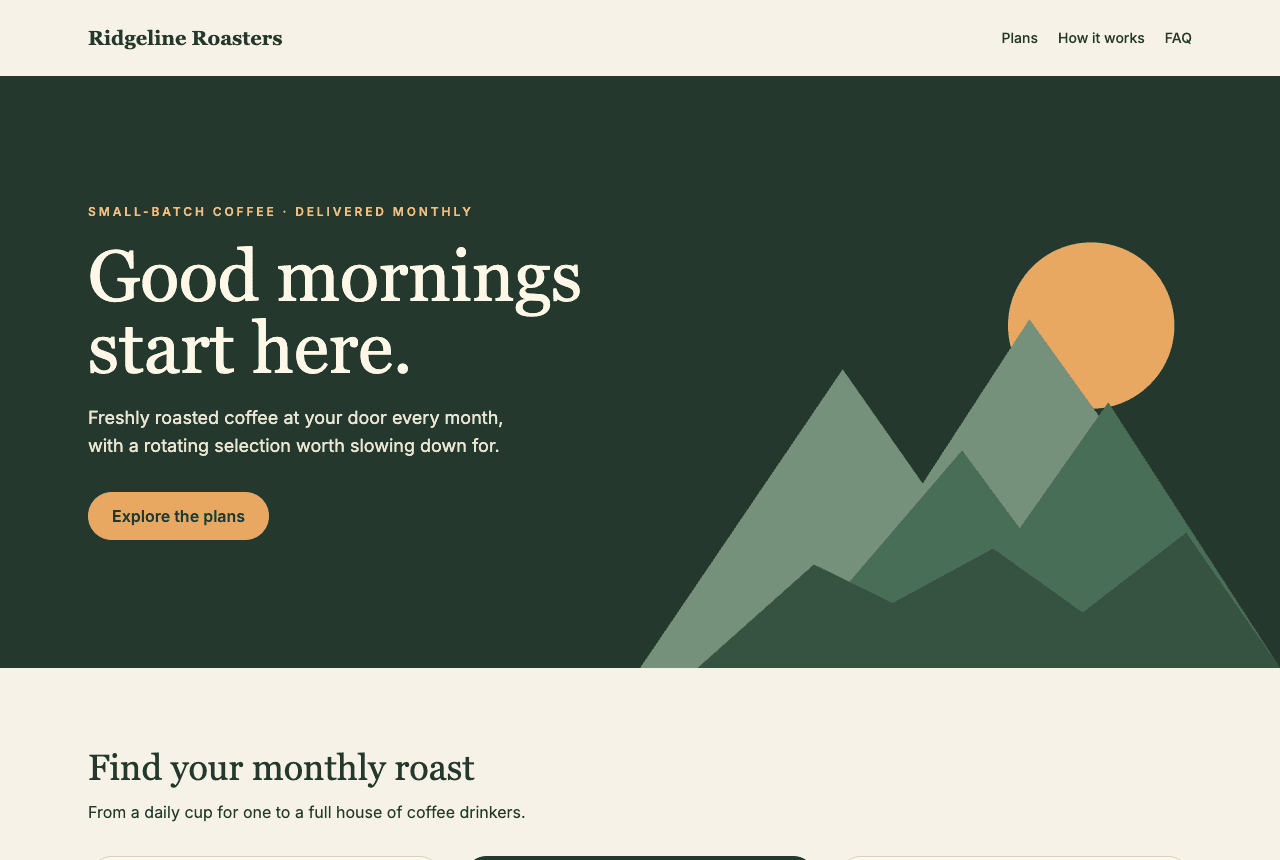
The model wrote three files:
app/page.tsx                  header, hero, plans, how it works, layout
app/components/Faq.tsx        5 questions using native details/summary
app/components/Newsletter.tsx 'use client' signup form with validation
Sections it generated
- Header with anchor links to Plans, How it works and FAQ.
- Hero with a kicker line, the headline "Good mornings start here.", a short pitch, an "Explore the plans" button and a mountain-and-sun illustration drawn as inline SVG, so no image files were needed.
- Three plans at $18, $32 and $45 per month (the model invented these prices; replace them with yours), with the middle plan highlighted.
- How it works in three steps.
- FAQ with five questions. The model used the browser's built-in
detailselement, so the accordion works without JavaScript. We did not record a separate toggle check for it. - Newsletter signup in a client component.
What is demo-only
Be clear about this before you show the page to anyone:
- The signup form goes nowhere. It validates in the browser, then resets. To collect emails you need to post to your email marketing service or your own API route, and handle consent and privacy notices.
- All copy and prices are placeholders written by the model. Treat them as layout filler, not as a proposal.
- There is no analytics, cookie banner or SEO metadata. The model did not write
app/layout.tsxor export page metadata, so ask for a title, description and Open Graph tags if you need them. - The preview URL is temporary. It lasts about 10 minutes; Share preview stretches that to at most 24 hours. Do not put it on a flyer.
Getting better first drafts
- Name every section in order. The prompt above lists five; the page has exactly those five, plus a header.
- Give real content when you have it: product name, three benefits, actual prices, the five questions customers really ask. The model fills gaps with plausible text that you will have to rewrite.
- Describe the visual direction in a few words ("dark green and warm orange, serif headlines") or attach a reference image with a vision model; see Screenshot to app.
- Ask for one change at a time in follow-ups: "make the hero shorter on mobile", "add a testimonial section after the plans".
- More prompt patterns are in AI app builder prompts.
Handing it off to hosting
- While the preview is still running, use Export, Full project from sandbox. You get the Next.js project without
node_modules,.nextor.envfiles. - Run
npm installandnpm run devlocally and replace the placeholder content. - Connect the form to a real endpoint and add a privacy notice.
- Deploy to a host that supports Next.js 14. Deployment and export walks through the options.
If the page is for a client, Client demos covers sharing a preview link and handing over the files.
Open this prompt in the builder