Gradio tutorial
Build a Gradio ML Demo with AI: A Tested Toy Classifier
A Gradio sentiment demo generated by GPT-6.2 Sol in LoomCode AI: the full app.py, what our browser test showed, its limits, and how to swap in a real model.
LoomCode AI can generate a working Gradio interface around a small model in one prompt, but the sandbox has no ML libraries and no model weights. So the honest way to use it is to build the demo, meaning the inputs, outputs, examples and explanation, around a model that fits, and then swap in a real model on your own machine or on Hugging Face Spaces. On 2026-11-22 we did that with a tiny Naive Bayes sentiment classifier written in pure Python. This page shows the code, what our browser test saw (including one frontend error), and how to replace the toy model.
Open this prompt in the builderWhy a toy model
The LoomCode Gradio sandbox runs Python 3.9.23 with Gradio 4.44.1 on CPU only. It doesn't include scikit-learn, PyTorch or transformers, and it has no model weights. Installing those packages and downloading weights would happen on every sandbox start, and each preview only lasts about 10 minutes. That's why the prompt asks for pure Python:
| Framework | Runtime | Key packages | Output | Observed in E2B |
|---|---|---|---|---|
| React | Node.js 22.23.5 | react 19.2.4, react-dom 19.2.4, vite 8.3.8, typescript 5.9.3 | web preview | Nov 23, 2026 |
| Next.js | Node.js 21.7.3 | next 14.2.20, react ^18, tailwindcss ^3.4.1, shadcn/ui components | web preview | Nov 22, 2026 |
| Vue / Nuxt | Node.js 21.7.3 | nuxt ^4.0.3, vue ^3.5.20, nuxi 3.28.0 | web preview | Nov 22, 2026 |
| Python (code interpreter) | Python 3.13 | pandas 2.2.3, matplotlib 3.11.2, plotly 6.0.1, seaborn 0.13.2 | notebook output | Nov 22, 2026 |
| Streamlit | Python 3.9.23 | streamlit 1.49.1, pandas 2.3.2, numpy 2.0.2, plotly 6.3.0 | web preview | Nov 22, 2026 |
| Gradio | Python 3.9.23 | gradio 4.44.1 | web preview | Nov 22, 2026 |
| PHP | PHP 8.2.29 | Composer 2.8.11, PDO (sqlite, mysql drivers) | web preview | Nov 22, 2026 |
| Laravel | PHP 8.2.29 | Laravel Framework 12.27.0, SQLite | web preview | Nov 22, 2026 |
The prompt
Framework Gradio, model GPT-6.2 Sol:
A Gradio sentiment demo that trains a tiny multinomial Naive Bayes classifier in pure Python (no scikit-learn or transformers) at startup, using 40 built-in labeled example sentences (20 positive, 20 negative). The interface takes a sentence and returns the predicted label with probabilities for both classes, includes 4 example inputs, and shows a table of the 10 most positive and 10 most negative words learned. Explain in the UI that it is a toy model trained on 40 sentences.
The prompt names the constraint ("pure Python, no scikit-learn or transformers"), the data (40 built-in sentences), every output, and the disclaimer. Leave out the constraint and a model will often reach for a library the sandbox doesn't have.
What the run produced
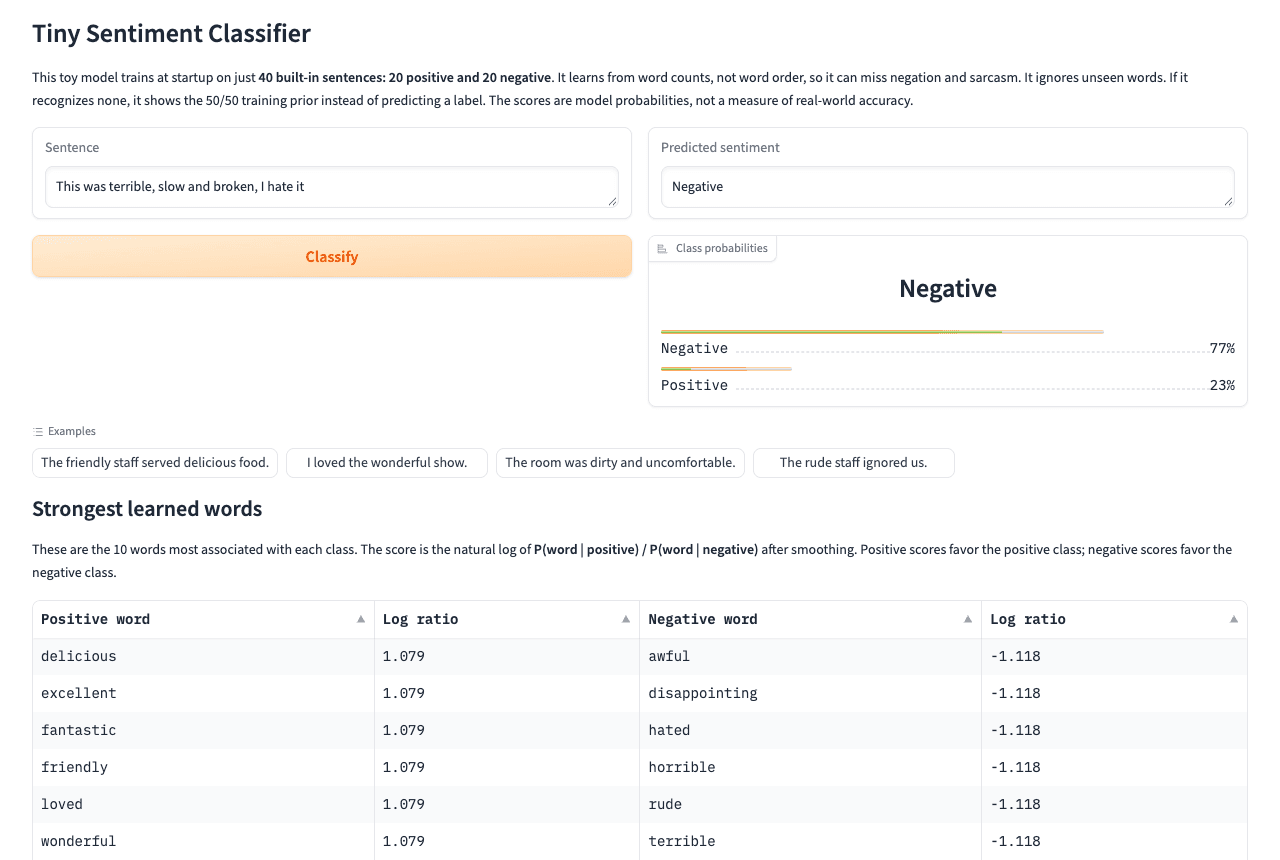
The generated app.py
import math
import re
from collections import Counter

import gradio as gr


TRAINING = {
    'Positive': (
        'I loved this wonderful movie.',
        'The service was excellent and friendly.',
        'What a delightful surprise!',
        'The food tasted delicious.',
        'I had a fantastic experience.',
        'The story was charming and funny.',
        'This product works perfectly.',
        'We enjoyed the beautiful view.',
        'The staff made us feel welcome.',
        'I am happy with my purchase.',
        'The room was clean and comfortable.',
        'The ending was satisfying.',
        'I highly recommend this place.',
        'The delivery was quick and reliable.',
        'This book is thoughtful and inspiring.',
        'The show was fun from start to finish.',
        'Everyone gave a wonderful performance.',
        'The friendly team did an excellent job.',
        'I loved the delicious dinner.',
        'It was a fantastic way to spend the day.',
    ),
    'Negative': (
        'I hated this terrible movie.',
        'The service was awful and rude.',
        'What a disappointing surprise!',
        'The food tasted horrible.',
        'I had a frustrating experience.',
        'The story was boring and confusing.',
        'This product broke immediately.',
        'We disliked the noisy room.',
        'The staff ignored us.',
        'I regret my purchase.',
        'The room was dirty and uncomfortable.',
        'The ending was unsatisfying.',
        'I would avoid this place.',
        'The delivery was late and unreliable.',
        'This book is dull and repetitive.',
        'The show was tedious from start to finish.',
        'Everyone gave a terrible performance.',
        'The rude team did an awful job.',
        'I hated the horrible dinner.',
        'It was a disappointing way to spend the day.',
    ),
}

WORD_PATTERN = re.compile(r"[^\W\d_]+(?:['’][^\W\d_]+)*")


def tokenize(text):
    return WORD_PATTERN.findall(text.casefold().replace('’', "'"))


class MultinomialNaiveBayes:
    def __init__(self, training):
        counts = {label: Counter(word for sentence in sentences
                                 for word in tokenize(sentence))
                  for label, sentences in training.items()}
        self.vocabulary = set().union(*(counter.keys() for counter in counts.values()))
        document_total = sum(len(sentences) for sentences in training.values())
        self.log_priors = {label: math.log(len(sentences) / document_total)
                           for label, sentences in training.items()}
        self.log_word_probs = {}
        for label, counter in counts.items():
            denominator = sum(counter.values()) + len(self.vocabulary)
            self.log_word_probs[label] = {
                word: math.log((counter[word] + 1) / denominator)
                for word in self.vocabulary
            }

    def predict(self, text):
        tokens = Counter(word for word in tokenize(text) if word in self.vocabulary)
        scores = {
            label: prior + sum(count * self.log_word_probs[label][word]
                               for word, count in tokens.items())
            for label, prior in self.log_priors.items()
        }
        # Subtract the maximum before exponentiating for numerical stability.
        peak = max(scores.values())
        weights = {label: math.exp(score - peak) for label, score in scores.items()}
        total = sum(weights.values())
        probabilities = {label: weight / total for label, weight in weights.items()}
        if not tokens:
            return 'No prediction: no words match the training vocabulary.', probabilities
        positive = probabilities['Positive']
        negative = probabilities['Negative']
        if math.isclose(positive, negative, rel_tol=0.0, abs_tol=1e-12):
            return 'Tie', probabilities
        return max(probabilities, key=probabilities.get), probabilities

    def word_table(self):
        positive = self.log_word_probs['Positive']
        negative = self.log_word_probs['Negative']
        ratios = {word: positive[word] - negative[word] for word in self.vocabulary}
        top_positive = sorted(ratios, key=lambda word: (-ratios[word], word))[:10]
        top_negative = sorted(ratios, key=lambda word: (ratios[word], word))[:10]
        return [[p, round(ratios[p], 3), n, round(ratios[n], 3)]
                for p, n in zip(top_positive, top_negative)]


model = MultinomialNaiveBayes(TRAINING)

with gr.Blocks(title='Tiny Sentiment Classifier') as demo:
    gr.Markdown('''# Tiny Sentiment Classifier
This toy model trains at startup on just **40 built-in sentences: 20 positive and 20 negative**.
It learns from word counts, not word order, so it can miss negation and sarcasm.
It ignores unseen words. If it recognizes none, it shows the 50/50 training prior instead of predicting a label.
The scores are model probabilities, not a measure of real-world accuracy.''')

    with gr.Row():
        with gr.Column():
            sentence = gr.Textbox(label='Sentence', placeholder='Enter a sentence…', lines=1)
            classify = gr.Button('Classify', variant='primary')
        with gr.Column():
            prediction = gr.Textbox(label='Predicted sentiment', interactive=False)
            probabilities = gr.Label(label='Class probabilities', num_top_classes=2)

    classify.click(model.predict, inputs=sentence, outputs=[prediction, probabilities])
    sentence.submit(model.predict, inputs=sentence, outputs=[prediction, probabilities])

    gr.Examples(
        examples=[
            ['The friendly staff served delicious food.'],
            ['I loved the wonderful show.'],
            ['The room was dirty and uncomfortable.'],
            ['The rude staff ignored us.'],
        ],
        inputs=sentence,
        outputs=[prediction, probabilities],
        fn=model.predict,
        run_on_click=True,
    )

    gr.Markdown('''## Strongest learned words
These are the 10 words most associated with each class. The score is the natural log of
**P(word | positive) / P(word | negative)** after smoothing. Positive scores favor the positive class;
negative scores favor the negative class.''')
    gr.Dataframe(
        headers=['Positive word', 'Log ratio', 'Negative word', 'Log ratio'],
        datatype=['str', 'number', 'str', 'number'],
        value=model.word_table(),
        interactive=False,
    )

if __name__ == '__main__':
    demo.launch(server_name='0.0.0.0', server_port=7860)
How it works:
- Tokenizing. A regular expression pulls out lowercase words, keeping apostrophes inside words. There is no stemming, so "hate" and "hated" are different words.
- Training. The class counts words per label, uses a 50/50 prior (20 sentences each), and applies add-one (Laplace) smoothing so unseen combinations don't produce zero probabilities. All math is in log space.
- Predicting. It sums log probabilities for words it knows and normalizes them into two probabilities. Words outside the 99-word vocabulary are ignored. If none are known, it says so instead of guessing.
- Explaining. The table ranks words by the log ratio of P(word | positive) to P(word | negative). The top six on each side tie at 1.079 and -1.118, because each appears twice in one class and never in the other.
- Interface.
gr.Blockswith a textbox, a Classify button, a read-only prediction box, agr.Labelfor class probabilities, fourgr.Examples, and agr.Dataframe. Both the button and pressing Enter callmodel.predict.
What the test sentences reveal
Our test sentences were deliberately not taken from the training data, and they show the model's limits. In the negative sentence, "hate", "broken" and "slow" are unknown, because the training data has "hated" and "broke". The prediction rests almost entirely on "terrible". In the positive sentence, "love", "great", "helpful" and "absolutely" are all unknown, and the label comes from weaker words such as "works" and "team". Both labels were correct, but for thin reasons. That is exactly what the UI warns about.
The frontend error
The browser recorded one uncaught JavaScript error from the Gradio frontend during the session: "undefined" is not valid JSON. The text captured from the page also included a notice reading "Error reloading app". Neither stopped the demo: both classifications returned results and the table rendered. We didn't trace the cause, and it comes from Gradio's frontend code, not from app.py. If you see it in your own preview, check whether the app still responds before debugging. If you run the app locally, check whether the error still appears there.
Swap in a real model
When the interface does what you want, replace MultinomialNaiveBayes with a pretrained model. Do this on your own machine or on Hugging Face Spaces, not in the LoomCode sandbox. We haven't tested this code in the sandbox, where it would need PyTorch and transformers installed and the weights downloaded on every start.
Using a transformers pipeline:
import gradio as gr
from transformers import pipeline

# A small English sentiment model; downloads weights on first run.
classifier = pipeline(
    "sentiment-analysis",
    model="distilbert/distilbert-base-uncased-finetuned-sst-2-english",
)

def predict(text):
    if not text.strip():
        return "Enter a sentence.", {}
    scores = classifier(text, top_k=None)  # scores for every label
    probabilities = {s["label"].title(): s["score"] for s in scores}
    return max(probabilities, key=probabilities.get), probabilities
predict returns the same two values as the toy model's predict: a label string and a label-to-probability dictionary for gr.Label. That means the existing classify.click(...), sentence.submit(...) and gr.Examples(...) calls keep working once you point them at the new function. Remove the "Strongest learned words" table, which only makes sense for Naive Bayes, and rewrite the explanation text for the new model. Its model card describes its training data and limitations.
Things to plan for:
- Install size and memory. PyTorch and the model weights add hundreds of megabytes. CPU inference for a small model like this is usually fine for a demo, but larger models may need a GPU.
- Load once. Create the pipeline at module level, as above, not inside
predict. - Concurrency. By default, Gradio's queue runs each event listener one request at a time. Raise
concurrency_limitonly if your hardware can handle parallel inference.
Run it locally and deploy to Hugging Face Spaces
Export Generated files (.zip) from the builder. You get app.py, a README.md and loomcode.json. Then:
python -m venv .venv && source .venv/bin/activate
pip install gradio==4.44.1
python app.py
The toy version only needs Gradio. The app listens on port 7860 on all interfaces, as written in its last line.
To give the demo a permanent URL, create a Space with the Gradio SDK on Hugging Face. Hugging Face's Gradio Spaces guide covers it. Put app.py in the Space, list extra packages (for example transformers and torch if you swapped the model) in a requirements.txt at the root, and set sdk_version in the Space's README metadata if you want to pin Gradio. The sandbox used 4.44.1, and newer major versions exist, so read the Gradio changelog before you upgrade. Gradio's share=True option creates a temporary public link instead. The current Gradio docs say share links expire after 1 week (checked 2026-11-22). Like a LoomCode share preview, that isn't hosting.
Our deployment guide explains LoomCode's export options and how a preview differs from a deployed app.
Reproduce it
- Click the builder button at the top of this page.
- If sign-in is enabled on this deployment, you'll be asked to sign in.
- Try the four built-in examples, then type sentences that use words outside the training set and watch how the probabilities move.
Your code will differ from ours, because models don't give identical output each time. Follow-up ideas, not tested: "Add a checkbox that shows which input words the model recognized" or "Let me paste extra labeled sentences and retrain."
Related
- The Gradio template page lists what the sandbox includes.
- ML demos covers when an AI-generated demo helps and when it doesn't.
- Streamlit vs Gradio compares the two frameworks using this run and our Streamlit run.
- Create a Streamlit data app is the tested Streamlit tutorial.